ArtCraft is an open-source studio known for its AI image and video tools. Since autumn 2026 the team (storytold on GitHub) has been publishing something more ambitious: the Craft Apps, thirteen native creative applications rewritten from scratch in Rust, free, under MIT / Apache-2.0 licences, for macOS, Windows, Linux, FreeBSD — and in the browser through WebAssembly.
The bet is clear: a free, lightweight alternative to the Adobe and Office suites, no Electron, no subscription, the same interface on every platform. We installed them on our Linux workstation to see where they stand.
The thirteen apps
- PhotoCraft — image editor (layers, retouching). Early alpha.
- VectorCraft — vector illustration.
- FilmCraft — video editing (the only app without a web version).
- LightCraft — photo library and RAW developer.
- PdfCraft — read, organise, merge, split, secure PDFs. Early alpha.
- EffectCraft — motion graphics and visual effects.
- DesignCraft — page layout and publishing.
- FigCraft — interface design and prototyping. Early alpha.
- WordCraft — word processing.
- SoundCraft — digital audio workstation.
- DeckCraft — presentations.
- CADCraft — technical drawing and CAD.
- GridCraft — spreadsheets and data analysis.
Three are labelled “early alpha” (PhotoCraft, PdfCraft, FigCraft), the others “in development” — but all already publish releases (0.6 to 0.12 as of 16 October 2026), almost daily.
The Launcher, the right front door
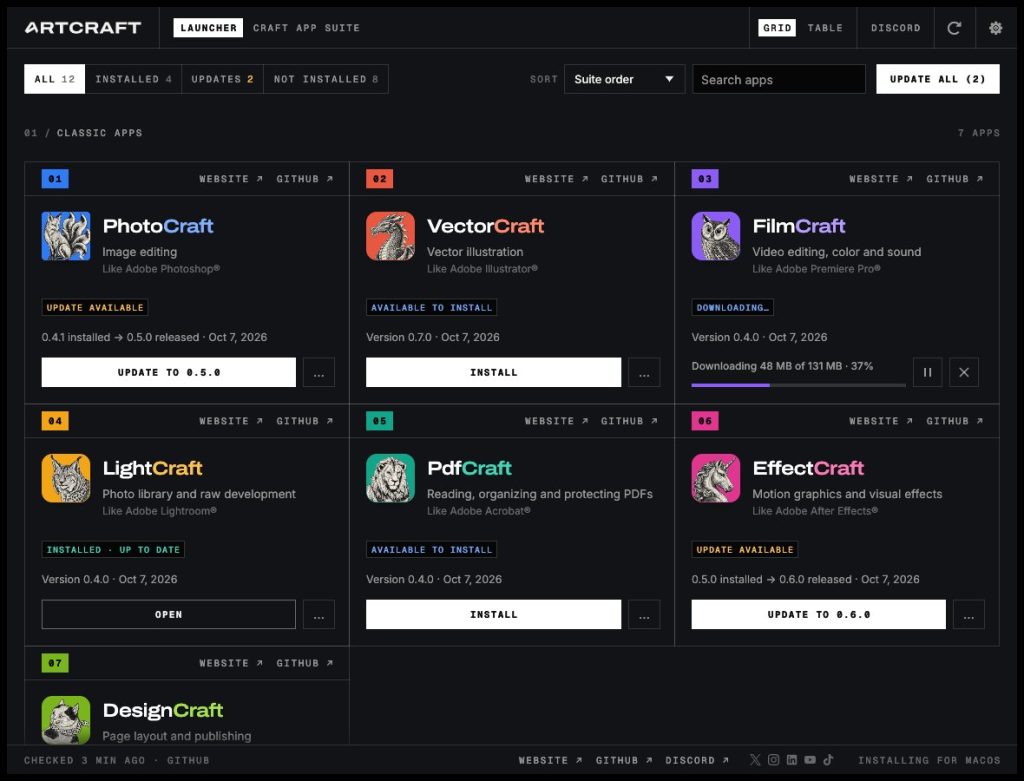
ArtCraft Launcher is a small native app (egui, no web view) that lists the suite, installs the right build for your OS and CPU, checks SHA-256 sums and notifies you of updates. On Linux it can install .deb/.rpm, Flatpaks or AppImages into ~/Applications; on Windows it installs for the current user without admin rights; on macOS it is a signed universal DMG.
Our install on CachyOS (Arch), without root
On our machine the user has no free sudo, and we wanted something reversible. So we went the AppImage way: a script downloads the latest GitHub release of each app, makes it executable in ~/Applications/ArtCraft/, extracts the icon and .desktop file from the AppImage and installs them into ~/.local/share/. Result: the thirteen apps and the launcher show up in the menu without touching the system. On Arch there are also AUR packages: artcraft-launcher, plus the storytold-suite (the 7 Creative Suite equivalents) and storytold-office (the 3 Office equivalents) metapackages.
The install script is provided in the members area (see the Download block below once logged in); run it again to update.
First impressions
- Instant start-up and low memory footprint: native Rust, and it shows.
- The three alphas are usable for simple tasks (crop, export, merge PDFs, sketch a mockup); the others are skeletons filling up fast.
- Identical interface everywhere, light/dark theme, consistent shortcuts.
- One to watch: the community is active (Discord) and the release pace is high.
We will come back to it when PhotoCraft and PdfCraft leave alpha. Meanwhile, it is the most promising free-software project of the year on the creative-tools side.
⬇️ Download & install
Installation
**Linux (any distro, no root)**: download artcraft-install.sh above, then:
chmod +x artcraft-install.sh && ./artcraft-install.sh
The script installs the Launcher and the 13 apps as AppImages into ~/Applications/ArtCraft/ with menu icons. Run it again to update. On Arch/CachyOS with sudo: paru -S artcraft-launcher storytold-suite storytold-office.
**macOS**: universal Launcher DMG on the GitHub releases page, then install apps from the Launcher.
**Windows**: Launcher MSI (per-user install, no admin) on the same page.